Ads Manager Account Overview
Redesigned Ads Manager Account Overview into a mission-critical insights hub, growing WAU from single digits to high double digits.
- Company
- Meta
- Year
- 2019–2020
- Role
- Design Lead, team of 5 across product design, content design, and UXR. Drove D-level cross-org alignment and end-to-end execution.
01
Problem
Problem
When I took on this project, there was already a basic understanding of the problems at hand. Previous attempts had struggled to translate that understanding into a successful solution — largely due to a lack of clear strategy, low cross-functional buy-in, and no demonstrated broader impact. Learning from those failures, we took a more strategic and collaborative approach.
User problem: Advertisers lack time to optimize their ad campaigns.
Advertisers — both small businesses and professional agencies — are overwhelmed by the sheer volume of tasks they juggle daily. Small business owners are often multitasking across sales, customer service, inventory management, and marketing, leaving little time to focus on optimizing ad campaigns. Agencies managing multiple clients face equally complex demands across performance tracking and client communication.
Both groups struggle to dedicate enough time or energy to properly analyze ad performance and make informed adjustments, which leads to missed opportunities for optimization.

Meta problem: Account Overview is greatly under-utilized, while delivery recommendations lack a dedicated space for impact.
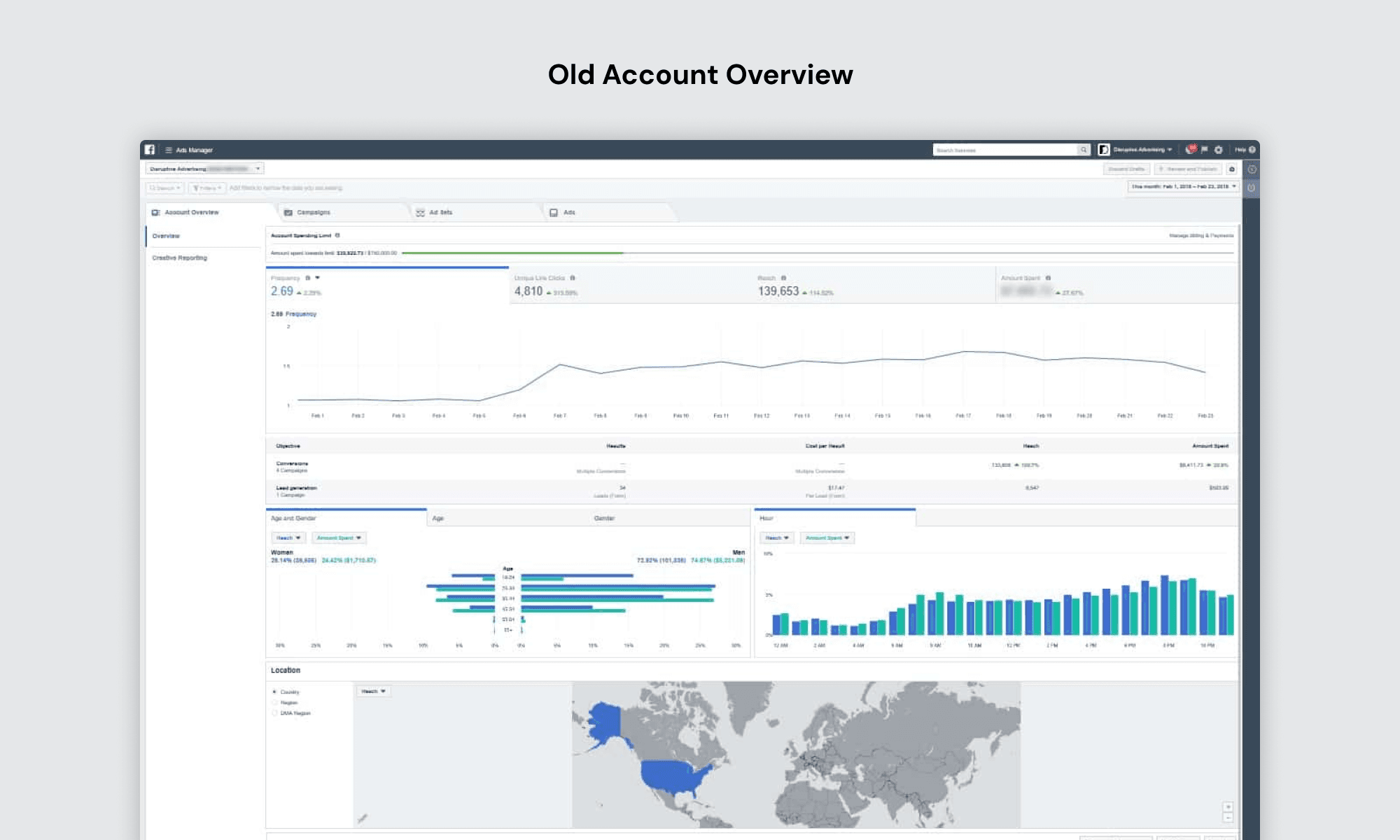
The existing Account Overview is underused — with single-digit Monthly Active Users (MAU). In a 2019 study with 21 participants, 19 considered the information irrelevant and only visited the Account Overview by accident, highlighting the need for a more relevant and accessible user experience.
The old Account Overview was metrics-heavy, featuring a built-in dashboard that displayed overly aggregated ad performance and audience data, which users found overwhelming.
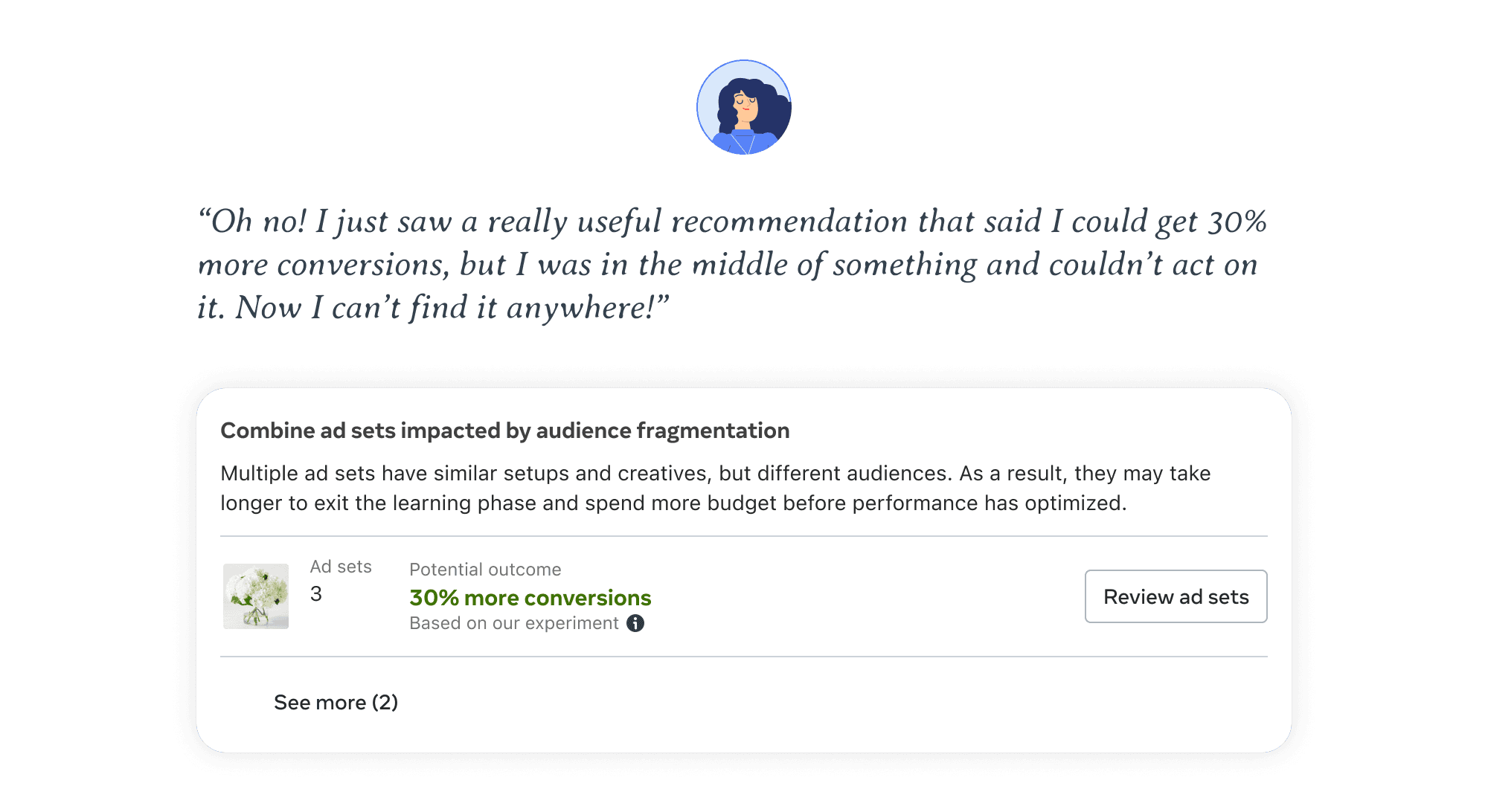
Delivery recommendations lack a dedicated space, causing advertisers to miss valuable, personalized guidance and limiting their impact. These are suggestions designed to improve the performance of active campaigns — but without a persistent, discoverable home, users would see a recommendation, get pulled away, and never find it again.
02
Goal
Goal
How might we transform the Account Overview into a space that users visit regularly and find valuable?
With this goal in mind, we pinpointed four key focus areas to drive success.
#1: Identify the right target user group.
Advertisers using Ads Manager vary greatly — from small business owners spending a few hundred dollars annually to large companies running million-dollar campaigns. It was crucial to understand which user segments presented the greatest potential for impact. UX researchers and product marketing managers contributed qualitative insights to help refine our focus.
#2: Bring valuable insights and actionable recommendations to the Account Overview.
Based on the target user group, we needed to identify what insights and recommendations were genuinely relevant for this surface — while also reevaluating existing content to cut anything that wasn't earning its space.
#3: Prioritize information ruthlessly.
Advertisers face information overload and have limited time. A well-structured information architecture ensures the most critical insights and actions surface first — minimizing cognitive load and maximizing efficiency.
#4: Make Account Overview flexible to meet advertisers' unique needs.
Recognizing the diversity in advertiser expertise, business models, and objectives, we needed to design a flexible interface that adapts to individual needs rather than forcing a one-size-fits-all experience.
03
Design
Design
Deep dive #1: Focus on underserved, high-potential user segments.
We analyzed data to understand which user groups presented the greatest potential for impact. UX researchers and PMMs contributed qualitative insights, and we reviewed existing Ads Manager personas to refine our focus. We narrowed down to two key segments:
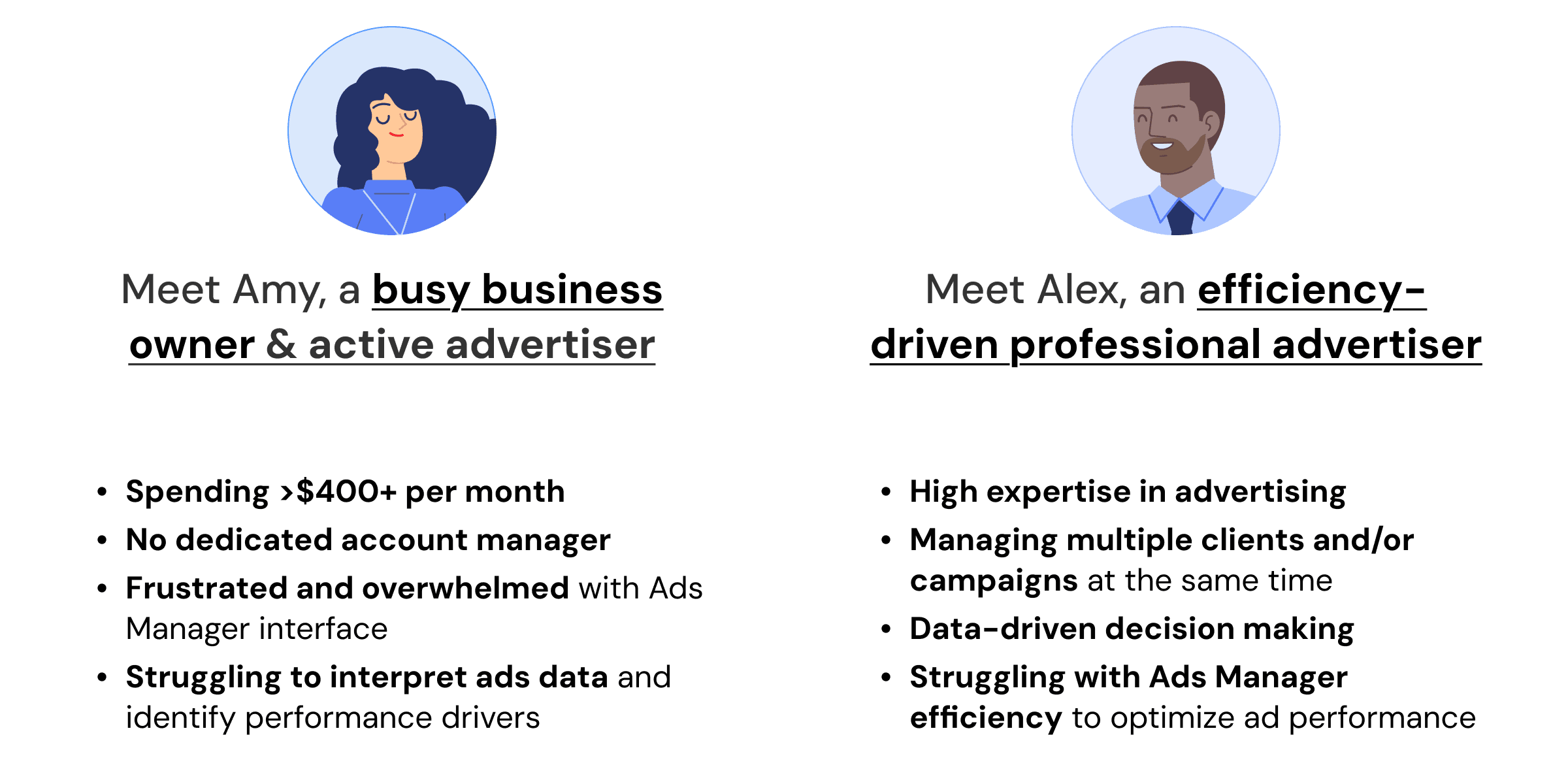
These two personas shaped every subsequent design decision. Amy needs hand-holding and clear next steps; Alex needs speed, precision, and configurability.
Deep dive #2: Remove irrelevant metrics and focus on actionable guidance.
Rather than adding to an already-cluttered surface, we first audited what to cut.
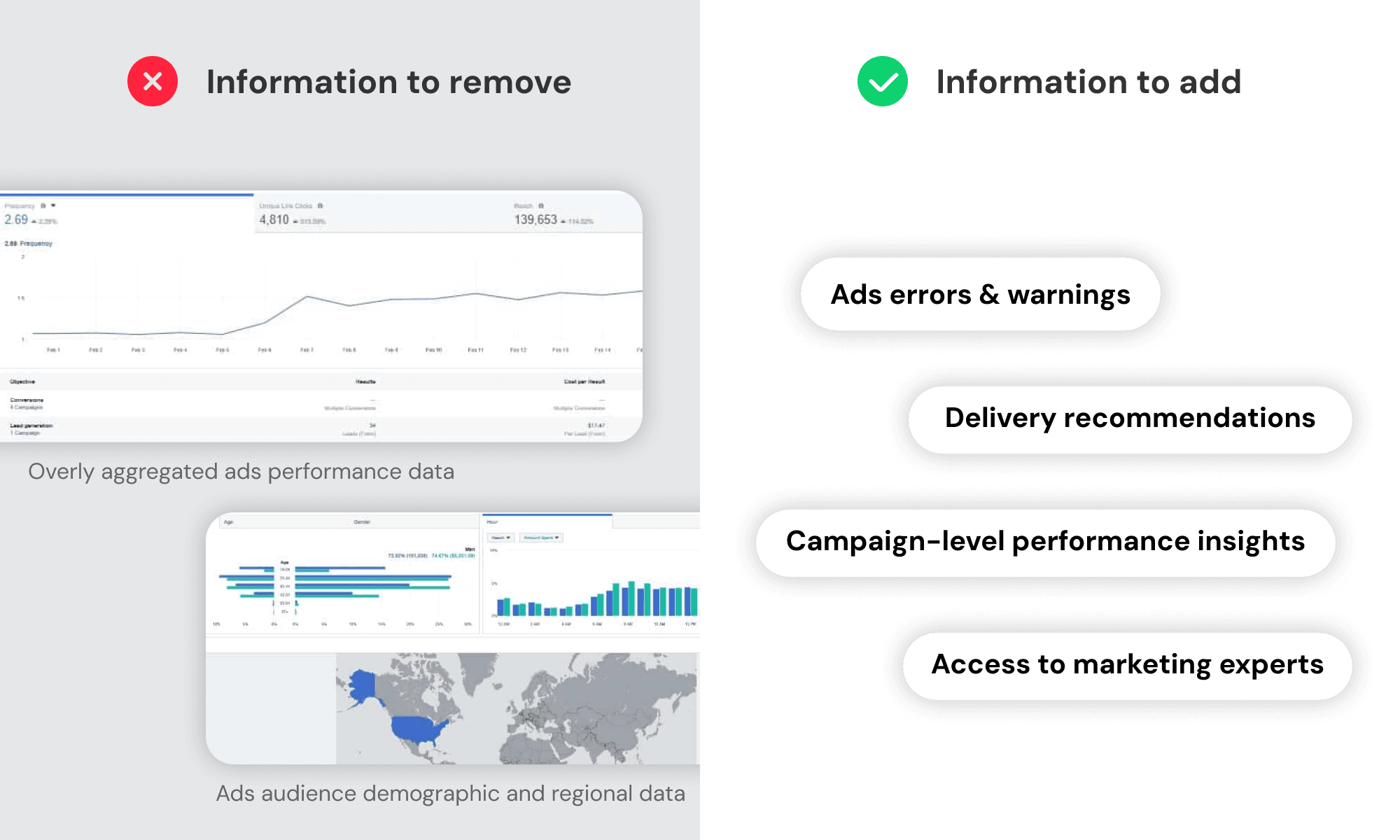
Information to remove:
- Overly aggregated ads performance data: Often misleading and irrelevant, especially with multiple ads having different objectives and budgets. Multiple interview participants noted this data as useless.
- Ads audience demographic and regional data: These data points tend to remain static. Most advertisers already have a solid understanding of their target audience, making this information redundant.
Information to add:
- Ads errors and warnings: Highlight urgent issues (e.g., ad limits) that require immediate attention to prevent ads from being paused or stopped.
- Delivery recommendations: Personalized, data-backed suggestions for improving active campaigns.
- Campaign-level performance insights: Essential metrics that help advertisers track progress without excessive aggregation.
- Access to marketing experts: Offer support for users like Amy, who don't have dedicated account managers, enabling access to expert advice when needed.
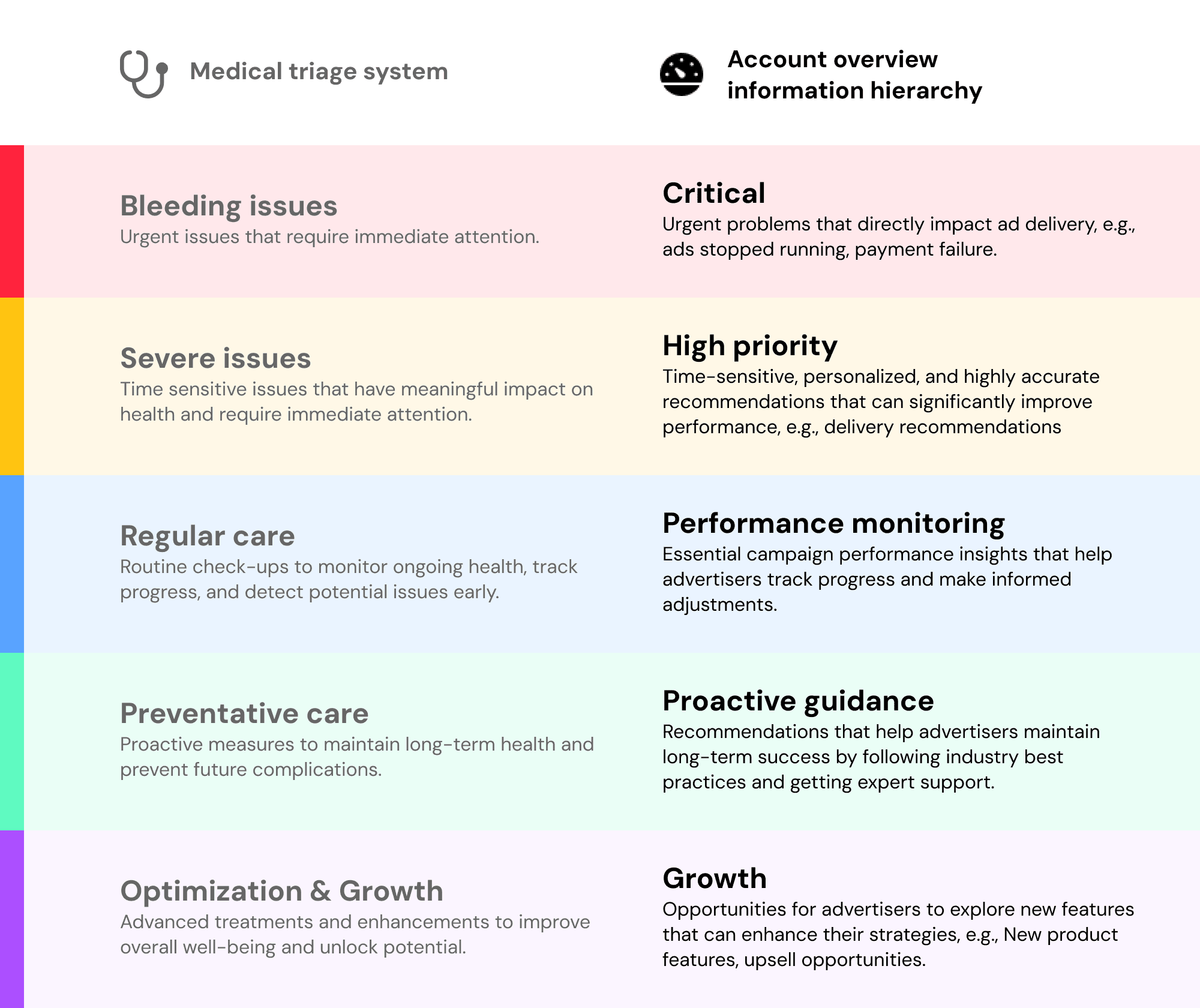
Deep dive #3: Establish an information hierarchy framework based on urgency and impact.
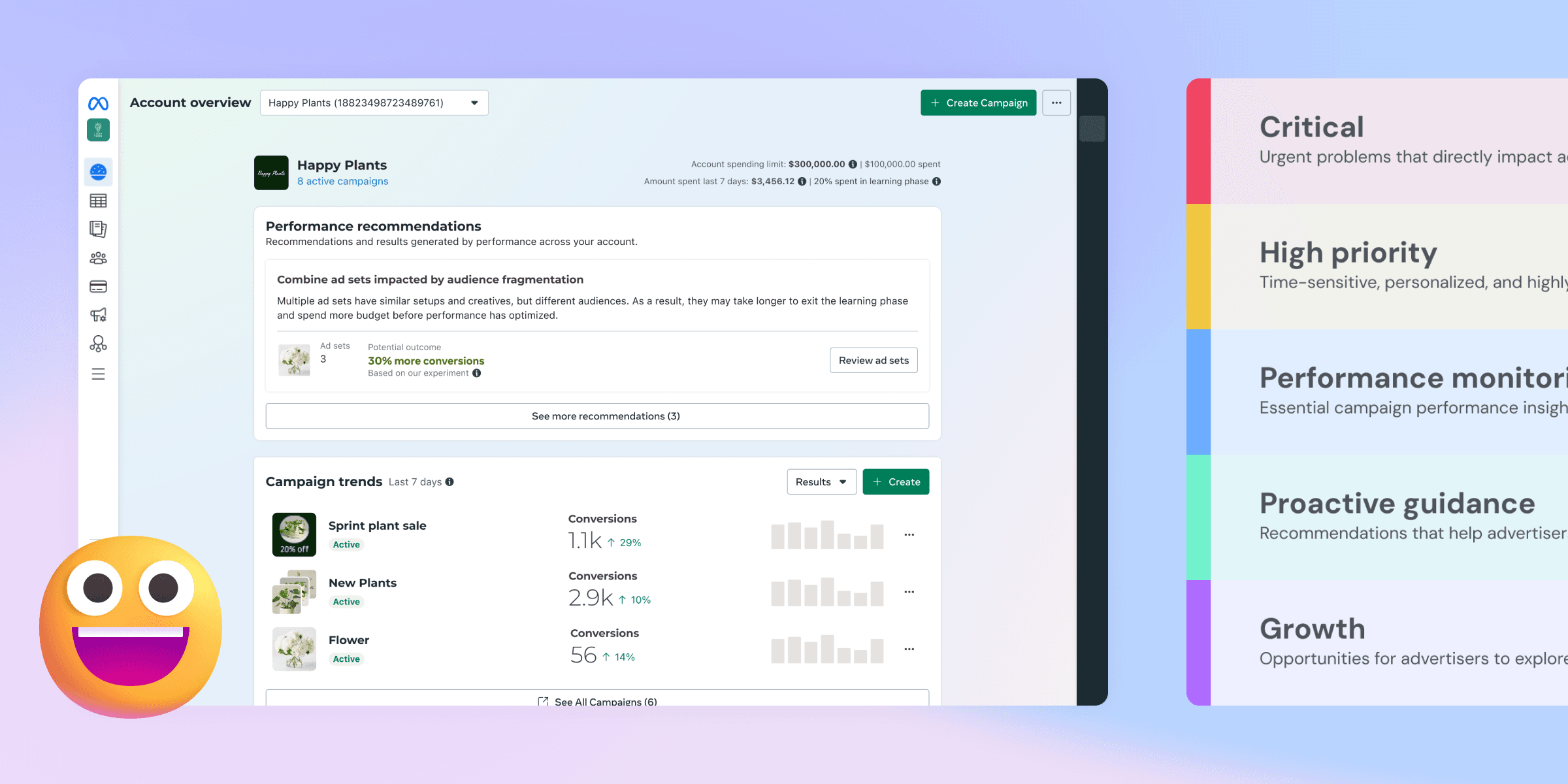
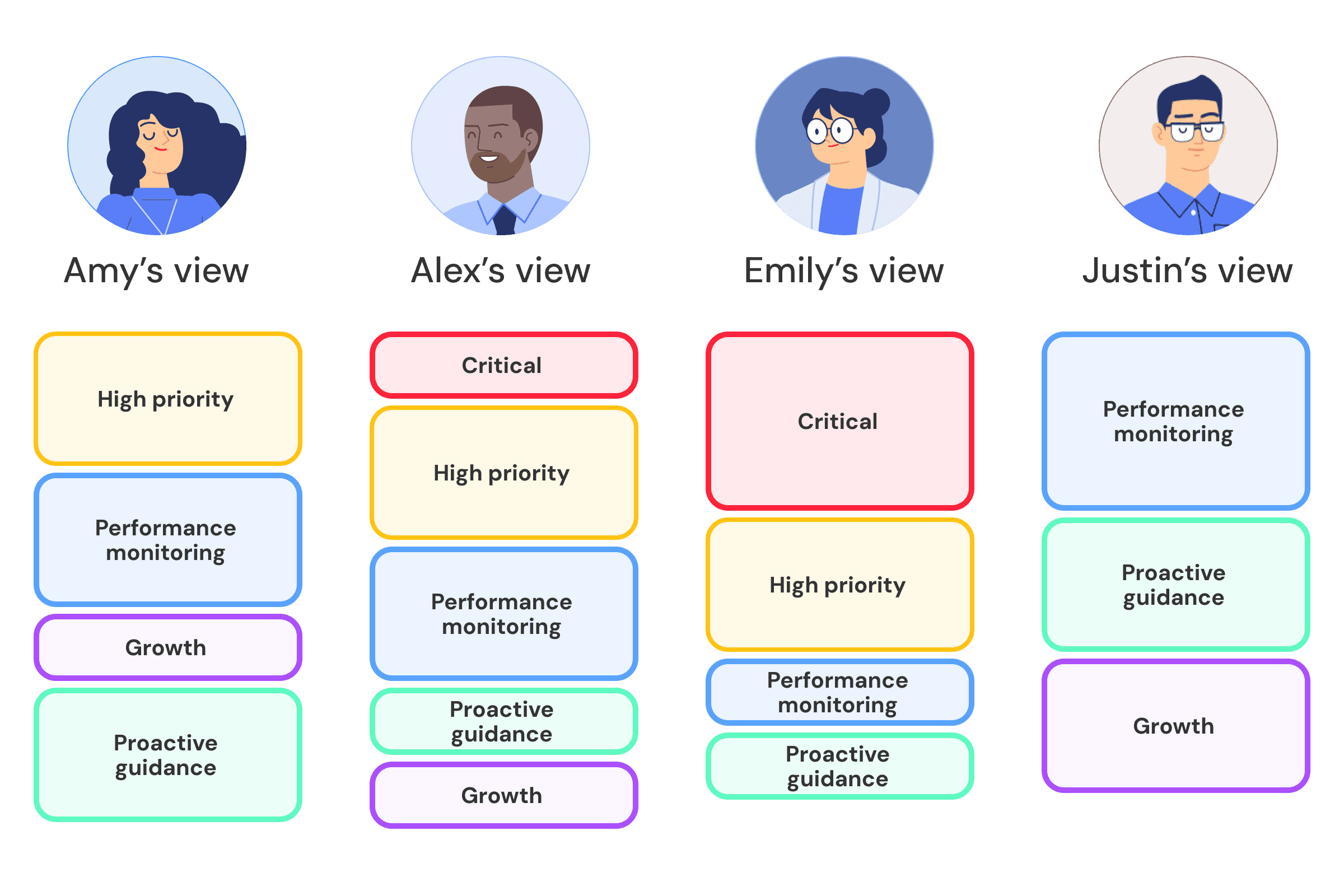
To determine prioritization, we leveraged an information hierarchy framework inspired by a medical triage system. This approach helped streamline design exploration and alignment by categorizing information based on urgency and impact.
Deep dive #4: Build a scalable design system prioritizing flexibility and future growth.
We explored various design approaches and ultimately adopted a card system for its flexibility and scalability. I led the design of the entire page — crafting each card and component to support both dedicated features and scalable templates. Some cards were built for specific functions; others provided a flexible foundation for future growth.
This approach not only improved information clarity but also set the groundwork for a more dynamic and extensible Account Overview experience.
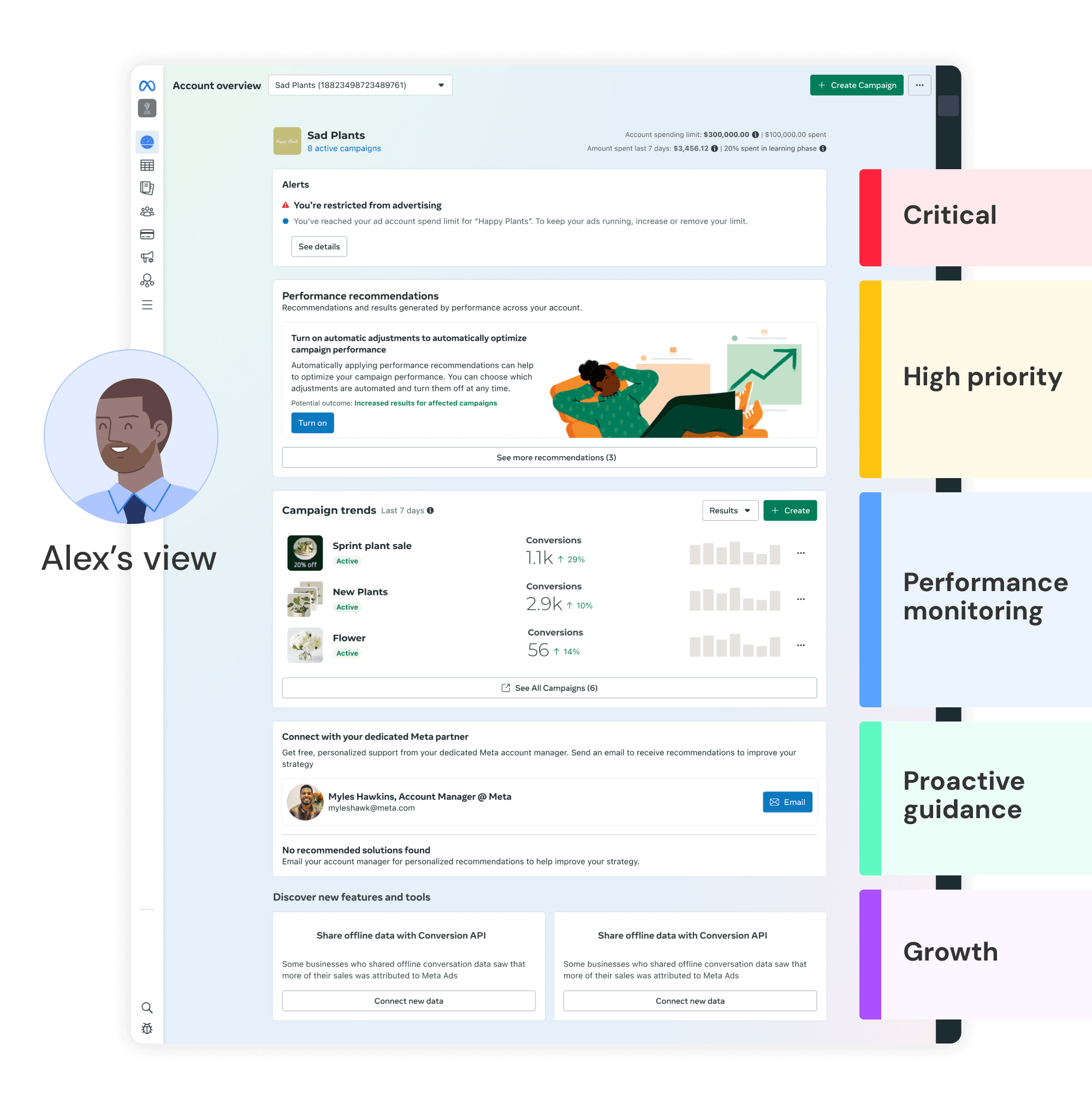
Deep dive #5: Dynamic interface tailored to each advertiser's unique needs.
Using the modular card system, each card is highly configurable — allowing users to prioritize the information most relevant to them, whether campaign performance, recommendations, or system alerts. This flexibility empowers users to personalize their layout, ensuring Account Overview remains focused, actionable, and relevant.
Amy's view could be very different from Alex's.
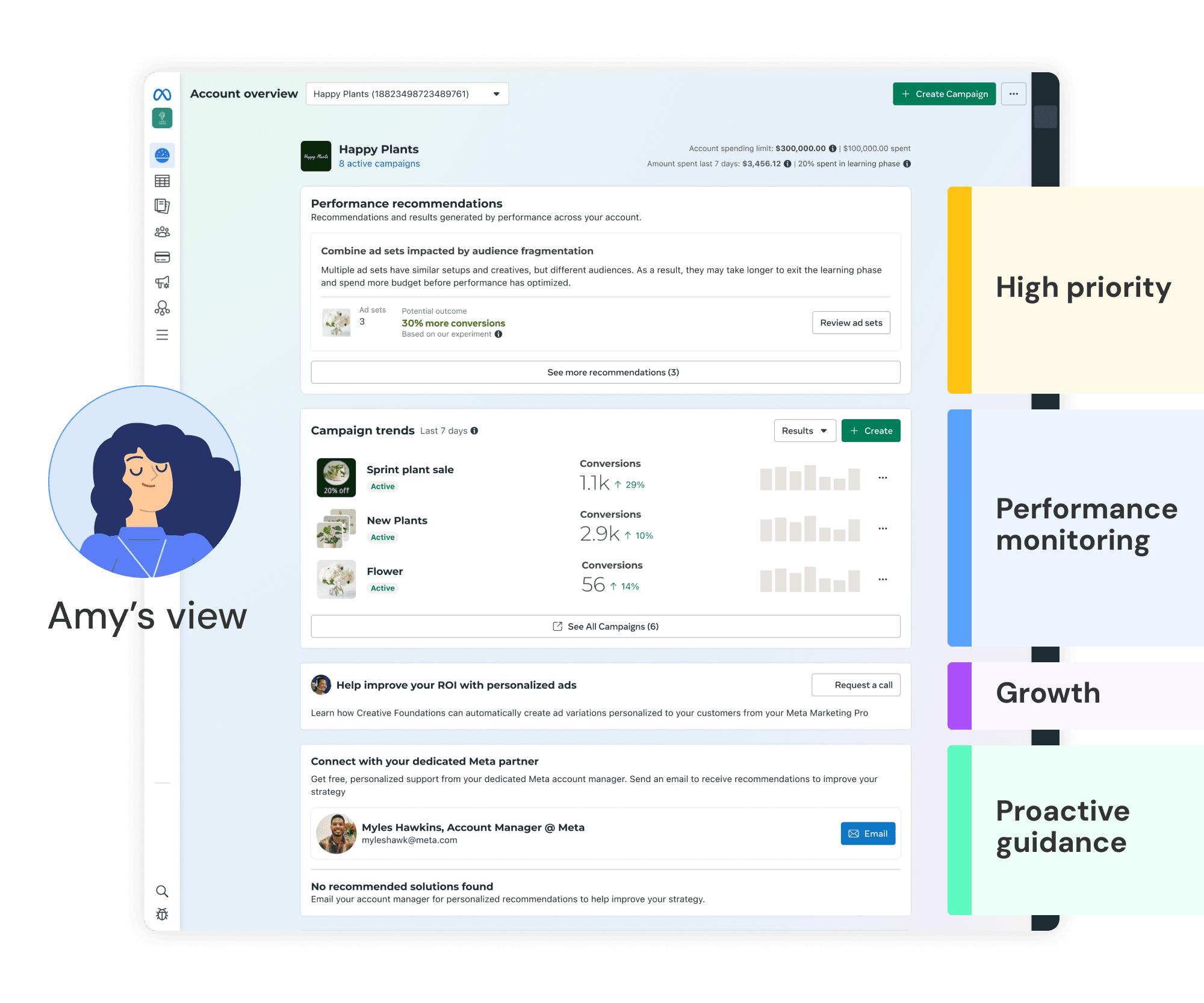
Every advertiser will have their Account Overview tailored to their unique needs, ensuring the most critical information is surfaced at the top.
04
Result
Result
Result #1: WAU grew from single digits to 27%, and MAU reached 40–50%.
After the redesign of Account Overview, we saw a significant boost in engagement. Previously, the page had low engagement with users often accessing it by accident. Following the new design, WAU increased to 27%, surpassing the projected 20% target. Over time, with further iterations and feature enhancements, MAU now fluctuates between 40–50% depending on the season — showcasing the design's effectiveness in driving regular, habitual engagement.
Result #2: Unblocked delivery recommendations — a mission-critical system driving significant ad revenue.
The new Account Overview became the permanent hub for Delivery Recommendations: a personalized, data-driven system aimed at optimizing campaign performance. This effort unlocked the potential value of delivery recommendations and significantly increased ad revenue by helping users make data-backed decisions that improved their campaign outcomes.
Result #3: Drove awareness of critical errors and dozens of new products for targeted user groups.
The redesigned Account Overview also prioritized critical system alerts — including errors, warnings, and urgent notifications — ensuring users were always informed of performance issues before they escalated. The page became a key entry point for users to connect with marketing experts, and the timely insights it surfaced improved campaign performance and increased user satisfaction.
05
Next
What's Next
The Account Overview revamp was a foundation, not a finish line. A few directions that emerged from the work:
#1: Deepen personalization with machine learning.
The card system was designed to be configurable, but true personalization — where the system learns and adapts to each advertiser's behavior over time — remains the long-term vision. Connecting user signals to surface ordering and content relevance is the natural next step.
#2: Expand the triage framework across Ads Manager.
The urgency-based hierarchy we established for Account Overview proved useful far beyond this surface. Applying a consistent prioritization model across campaign management, notifications, and support touchpoints would create a more coherent experience end-to-end.
#3: Scale delivery recommendations.
With a dedicated home established, the opportunity is to grow the recommendation engine — improving signal quality, expanding recommendation types, and personalizing them further by advertiser segment and business objective.